The release notes provide information on the features and improvements in the specified version. The release dates that are related to the version of the release are published in the Curriculum/Workload Management release schedule.
Improved object admin tabs - CUR-3912
The /admin tab of fourteen objects — study, module, module group, faculty, organisation, specification, qualification, assessment, method, assignment, person, team, rule and definition — now all look and work the same way.
Each object used to carry its own hard-coded list on top of the fields you configured: team and organisation showed a fixed set and nothing else, person left out every field an institution had added, and the other objects forced a handful of fields out of sight. The Admin tab now shows all the visible fields configured on the object type, in the order and with the visibility you set on them. Four fields are the exception and are always shown here, whatever the configuration says, because they are what this page is for: the UID, the publication date, the import date and the dispatch date. Those four are now read-only, so they can be read and copied but not edited.
The actions moved into the header of the page - Import, Export, Invoke hook, Restore and Save, with Delete and Delete (+ History) under Actions beside them - and each is shown only where it applies.
Creating and editing a team with custom fields - CUR-4279
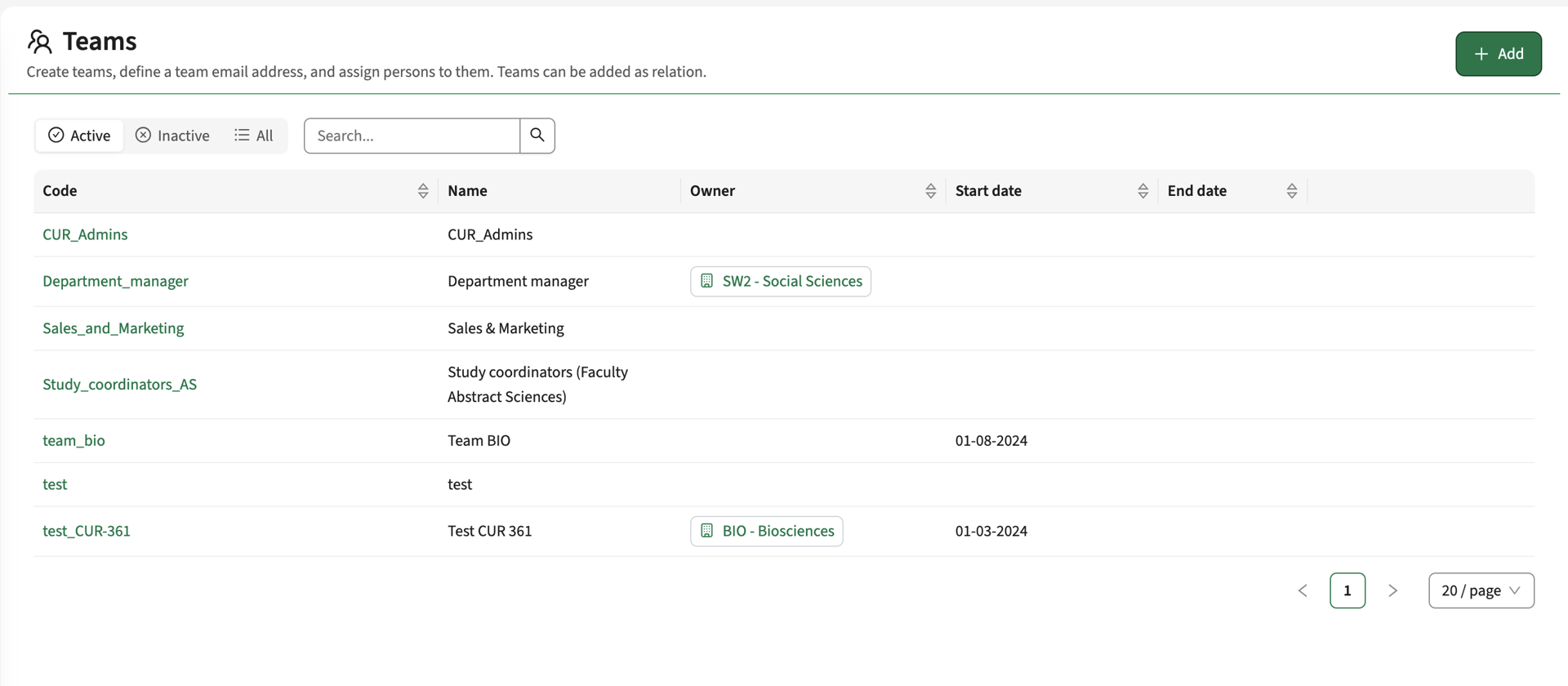
The teams administration page at /admin/teams was rebuilt. Creating or editing a team now shows every field configured on the Team object type, now with custom fields included; the previous window listed a fixed set of eight fields, so anything else you added was never shown.
Creating a team goes through the same window as the other create actions, so a create page configured on the object type applies to it too, and editing asks for a motivation where the custom type requires one. The page gained a search box, an Active, Inactive and All filter, and a code that links through to the team.
The team's own tabs and the teams page that can be added to another object keep the previous window for now.
Activity groups can be defined per offering - CUR-4192
Groups are how the students taking an activity are divided into parallel deliveries — practical session groups, for example, where a lecture normally has one group and a practical has several. Until now a group belonged to an activity serie, and the number of groups was a single number on the teaching method, so every offering of that method got the same groups. A method offered to 150 students in one semester and 20 in the next could not express that: with a maximum group size of 25 the first needs six groups and the second one.
Groups can now be defined on the teaching method while still differing per offering. The number is worked out for each offering separately, from a formula on the number-of-groups field that can read the offering's own figures — for example the number of students on the offering divided by the maximum group size, rounded up.
For instance, a formula like this can now be configured on the method's numberOfGroups field:
ceil(:offering.totalExpectedParticipants / :maxGroupSize)
Groups are worked out when the groups page is opened and whenever the offering changes, and a workflow step can generate them for every active offering in its period.
Turn it on under Administration -> Configuration by setting schedule.generate_method_groups to true. It is off by default.
- With the setting off nothing changes. Groups are generated on the activity serie exactly as before, with the same count, the same numbering and the same values, and existing groups keep the activity serie they belong to.
- Assessments are never affected. Assessment series keep owning their own groups.
- Groups defined per offering stay inside Curriculum. They appear on the groups page and in the activity group report, but they are not part (yet) of the CSV import and export or the export to Activity Manager, which can only carry a group that belongs to an activity serie. If you run one of those integrations, leave the setting off for now.
The activity groups page and the activity group report were rebuilt at the same time, and that part applies to everyone. Each group is now opened and saved on its own in a window, rather than every group being edited at once behind one save button, and the list is ordered by group number instead of in no particular order. Lowering the number of groups no longer removes what was entered: the groups above the new count are marked as removed and the change history keeps their values. Raising the number again brings back an empty group rather than one carrying values entered for something else — to the person looking at it, a group that reappears is a group nobody has filled in yet.
Simulations - CUR-4111
My simulations at /simulations, Create simulation and Edit simulation were rebuilt. The Simulations group in the academic year menu no longer runs off the bottom of the screen when there are many simulations: it scrolls, and it opens upwards where there is not enough room below. New simulation and Manage simulations moved to the top of that menu, and in the simulation lists each row's edit and delete button now says which row it belongs to, which matters when working with the keyboard or a screen reader.
Working with a removed academic year was tightened up at the same time. Deleting an academic year now clears its default flag, so a deleted year is no longer the configured default and a restored one has to be chosen again. Every switch into a year refuses a year that has been removed, including Back to original on a simulation whose origin year no longer exists. Deleting the simulation you are working in returns you to the default academic year, and when the default year itself has been removed the application falls back to a year you can select instead of starting with no year at all.
Saving could fail for a user who is not an administrator - CUR-4284, CUR-4294 (Hotfix)
On a page that creates a new additional, a user who is not an administrator could get an error on save, with no explanation and nothing stored. It happened only where that page holds fields the user is not allowed to edit: those fields are reset on save, and the reset collided with reading the same set of fields. An administrator may edit everything, so the problem never appeared for one. We've also fixed some other issues related to creating objects.
Copying activities from another offering - CUR-4221 (Hotfix)
The Method schema tab of a module shows its teaching methods and the activities attached to each, and Copy takes the activities of another offering. Three things went wrong. The Amount in the copy window counted the module's own activity series rather than the set about to be copied, so it could read 0 and block the button. A copy that met one row it could not create stopped there and silently left the rest uncopied. And the activity series of a method without a code were skipped altogether, while the copy reported success. All three are fixed, and the copy now reports how many activity series it created. The same Copy window is used on the appraisals tab and on the activity page templates.
Form validation on a submit button is clearer and reachable with the keyboard - CUR-4221 (Hotfix)
On every form in the application, a submit button that cannot yet be used keeps its place in the keyboard order instead of dropping out of it. It still looks and behaves as unavailable, and it now explains which fields are blocking the submit, so the reason reaches anyone working with the keyboard or a screen reader and not only someone who can see the whole form.
Advanced filters for new reports - CUR-4139
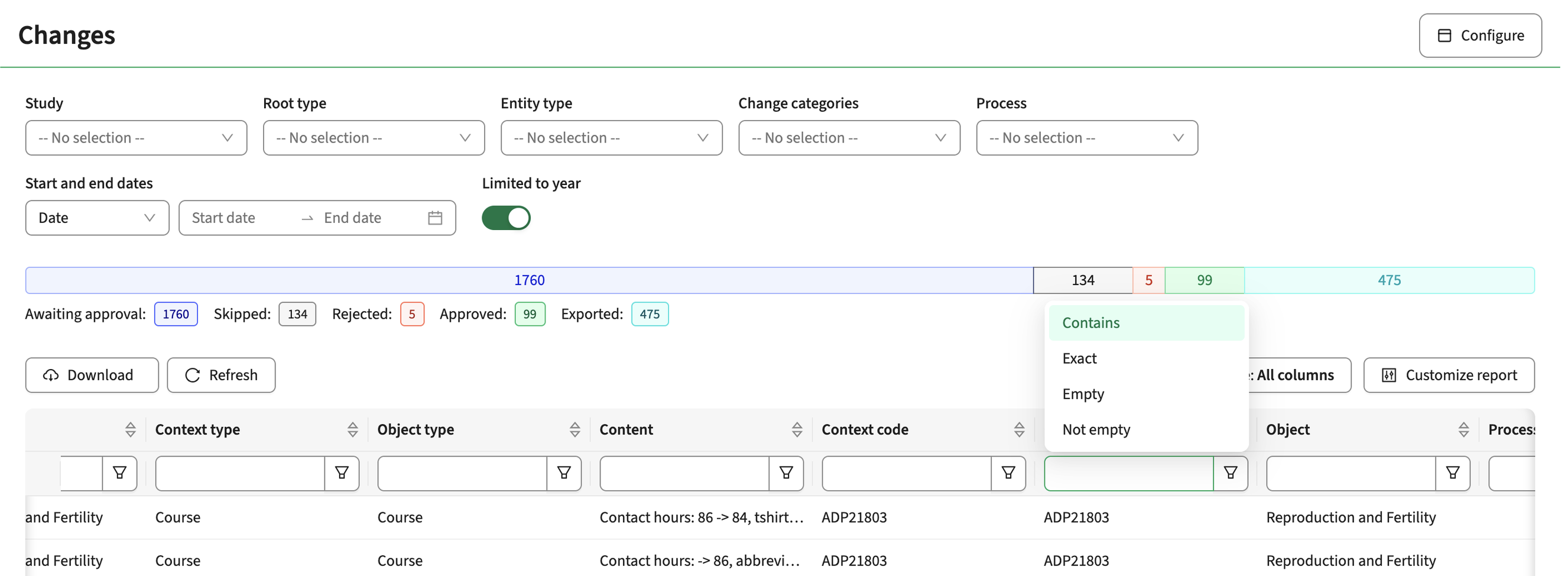
The Changes, Assignments, Competences and Applicants reports share one component, so this applies to all four. Each column now has its own filter beside its search box, offering Contains, Exact, Empty and Not empty. Not empty is new; the other three behave as they did. The search box suggests values that occur in that column, eight at a time, saying how many were left out, and boolean columns offer all four options again: Yes, No, No or undefined, and Undefined.
Two things work differently. The Search button in the toolbar is replaced by a Clear button, shown only while something is filtered: the old button cleared the filters when it hid them, so a report opened from a template with stored filters could come back short with nothing on screen to explain why. And because setting a filter has to load every page of the report, there is now a panel above the table showing how far it has got against the total, with a Cancel. The result is kept for five minutes, so typing does not start the loading again.
On the Assignments report the name search moved into a Name column. That one is answered by the server, so it is the first filter on these reports that does not have to load the whole report first. It matches the assignment's code and the person's name as well as the name in the column.
The Changes pages can be configured for consulting instead of reviewing - CUR-4264
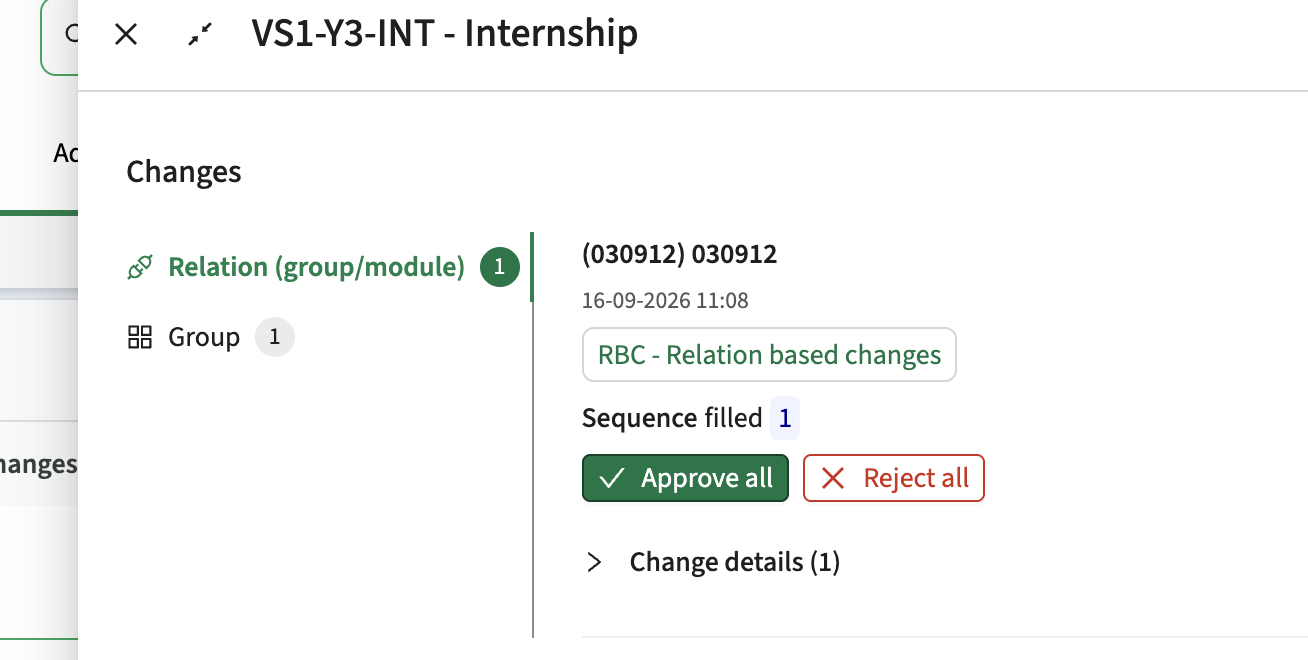
The changes-list and changes-report page templates each take two new parameters. Set hide review buttons to true to remove Approve change and Reject change, the bulk toolbar and the selection boxes, while leaving the comments, the replies and the change status untouched. Set read only to true for that plus the reply action. This helps where the right to approve cannot be taken away by permission because an integration depends on it, and the page should still be open for discussion.
The Changes pages are easier to read and to work with - CUR-4184
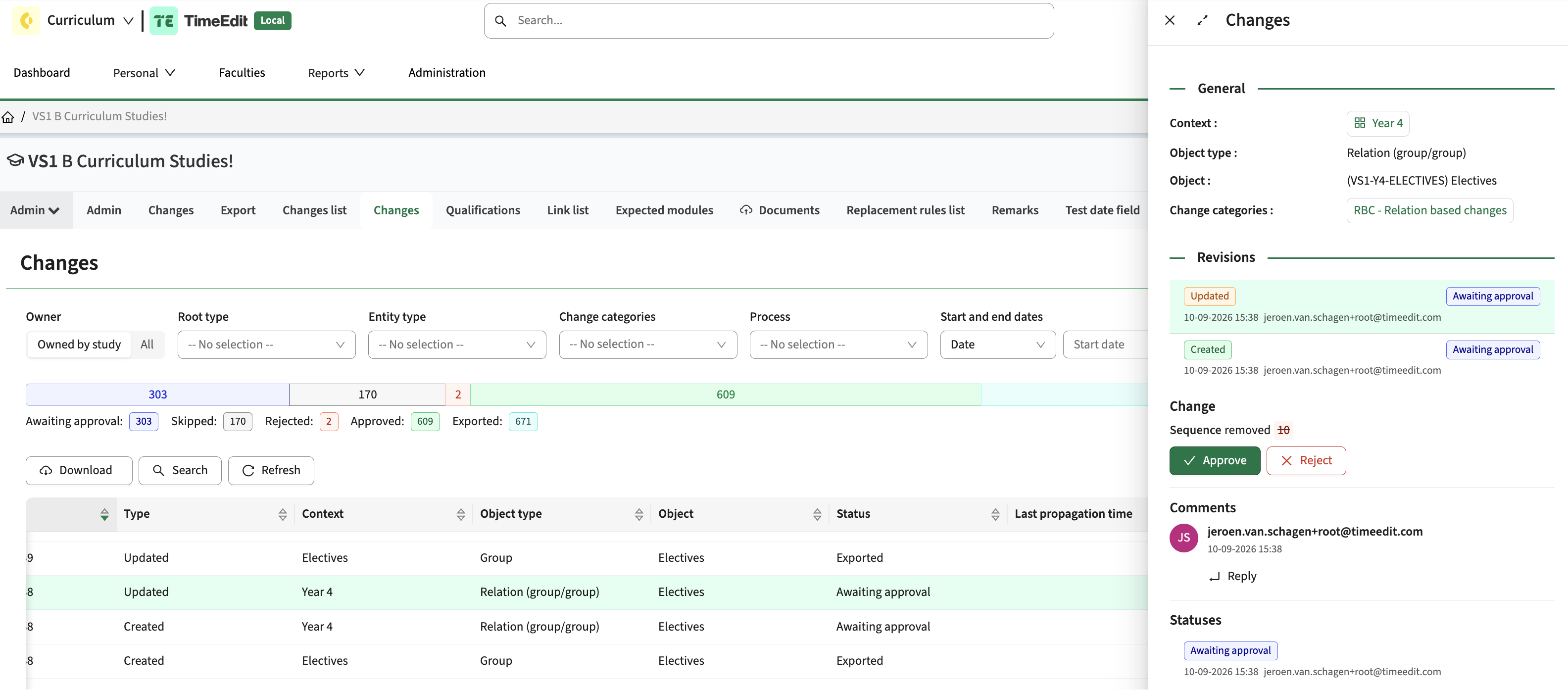
The Changes report, the change drawer and the changes list were reworked. The drawer now opens with General, then Revisions, then the revision you selected, with Approve change and Reject change directly under the properties of that revision and Comments before Statuses.
Selecting a revision moves the highlighted row in the report with it, so the two stay in step, and the status history uses the same row layout as the revisions.
Teacher remarks are shown in the Staff availability report and in the API - CUR-4031, CUR-4033, CUR-4114
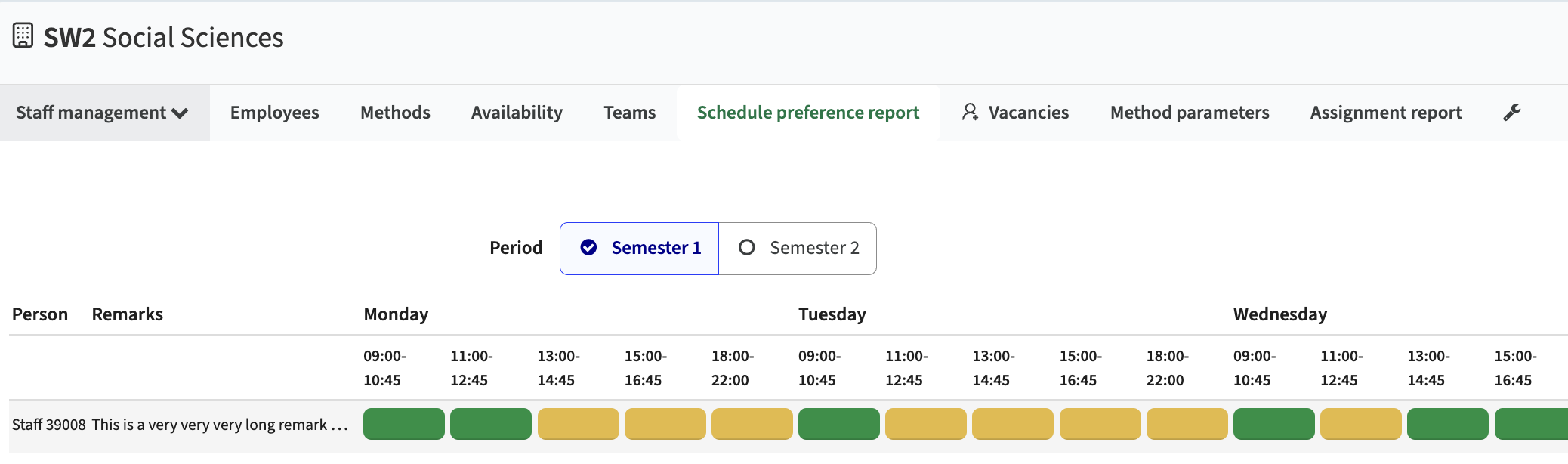
On the availability preference page a teacher records when they are available to teach, and can add a remark. Schedulers could not see which teachers had left one, because the report showed only the day and time-block choices. Remarks is now a column in the details of the Staff availability report and on the Schedule preferences tab of a person, sortable like the other columns and shortened in the cell with the full text on hover. A remark is recorded once per person and period, so it is the same on every row for that person in that period. The Staff availability report is now also sorted by name by default, rather than by an internal identifier.
The same remark was added to the availability preference endpoint, so an integration receives what the report shows. It is optional: a preference without a remark leaves the field out rather than sending an empty value.
Documents can be stored on a person, and stay visible when you switch academic year - CUR-4181
Adding a document through a competence or an applicant workflow failed. A document can now be stored on any object. A person's documents are also no longer filtered by academic year, so they stay visible when you switch year, which matches the way person and competence data already works.
Purging a deleted academic year now removes the documents that were uploaded on that year's objects as well. Before, the purge left them behind, and because they no longer belonged to a year they then appeared in every year.
Saving a competence or an applicant no longer clears the fields the window does not show - CUR-4092
Editing one field on a competence or applicant record could empty the fields the window does not display: the external identifier, the code, the validity dates, and any custom field configured on the object type but not placed on that window. Those values are now sent back unchanged. The rebuilt Admin tabs described above use the same form and are covered by the same fix.
An organisation can now be set on a specification and on a qualification - CUR-4072
A study and a module can be linked to a department through their organisation, and processes follow that link to find the related roles. A specification and a qualification had no such field, so a custom field had to stand in for one and processes at that level could not find the department. Both now carry an organisation next to the faculty they already had — organisationId on the object, an organisation reference in the canonical API, and a column in the CSV import and export that takes the organisation's external identifier or its code.
Worth knowing before you fill it in: access rules and role propagation follow the organisation, so setting one on a specification or qualification lets everyone holding a role on that organisation reach it. It only ever widens access, never restricts it, and the same field is used to resolve process notification recipients and the responsible person for a process. Check your role assignments on the organisation before populating the field across a catalogue.
Integration
Extensions, improvements and fixes to the integrations: the Curriculum API, OOAPI, CSV import, and the data exchange with Data Manager, Core and the broker.
Sending teacher availability to Core no longer stops at the first failure - CUR-4233 (Hotfix)
Availability is sent to Core with Invoke hook, from the report of a process or from a process step. It failed for most rows while part of the data did arrive, which left the export impossible to repeat because Core already held what had been sent. Two separate defects caused it: a successful answer from Core could not be read at all, because it leaves a field empty where a number was expected, and a batch that met a failure stopped the batches behind it. Both are fixed — the remaining batches are now sent, and the failures are reported as one readable line rather than an unreadable error.
Security
Our build process scans continuously for known vulnerabilities. Fixes are prioritised by impact: some go out as an immediate hotfix, others in the current or next sprint. See the central database of vulnerabilities for details.
Implemented security fixes - CUR-4214
Change and feedback data is now returned only to users who may view changes on the object concerned. Every remaining endpoint that reads it, including the report cells that render change content, refuses a user who has been denied access rather than answering with an empty result.
View feedback now includes view changes. A reviewer holding only View feedback sees the Changes tabs, the changes list and the Changes report together with the review discussion; a user holding only View changes sees what changed but not the discussion.
Continued investment in tooling and quality
Ongoing improvements to our automated testing, build pipeline and dependency scanning, so errors and security issues are caught earlier.
Refer to the Workload Manual for configuration guidance.