The release notes provide information on the features and improvements in the specified version. The release dates that are related to the version of the release are published in the Curriculum/Workload Management release schedule.
Improvements
The issues in release mentioned under the section improvements are considered as new functionality, user experience improvements or bug fixes. Issues marked as Hotfix have been developed during this Sprint release, but are hotfixed and technically added to the previous release or direct to production based on the impact of the issue.
As an administrator I want to define attributes for scripts - CUR-4064 (Hotfix)
The migration of the script page to the new look and feel, accidentally added a more strict validation on the input fields. This prevented for instance to type the cron execution timing of scripts. This has been fixed, and the input fields can be used as expected.
As a admin I want to search faster for a roles - CUR-4066 (Hotfix)
When searching for a role in the admin tab, the search for the role when using code or externalId was executed after every character typed. This was causing some UX side-effects of waiting and annoyance. This has been fixed, and the search will now wait a little longer to allow for multiple characters to be typed before the search is executed.
Versioning information should only be shown in case versioning is enabled - CUR-4076 (Hotfix)
The implementation of the versioning introduced some new information and warning messages when manipulating module-groups. There should be validation to only show them in case versioning is enabled, but this was not the case. This has been adjusted, and versioning related messages will only show when versioning is enabled.
The workflow welcome page should respect the alignment - CUR-4068 (Hotfix)
The welcome page didn't respect the alignment set. This has been fixed, and the alignment set will be respected.
The search for relations should be faster - CUR-4065 (Hotfix)
When searching for relations previous results or no results could be shown. This could be caused due to the previous search was not yet finished. Fixes are applied to wait a number of milliseconds between the character typed and starting the search, giving the use a little more time to type more characters before hitting the search immediately after the typed character. The search has been optimised with a performance boost of up to 5 times.
The assessment matrix should show results - CUR-4026
In case an assessment was defined for a module with no offerings, and the assessment was part of the assessment tree of matrix, the page wouldn't show. In a production setting not likely to happen. A change is made to be more forgiving in this two pages for modules with no offerings, so the information will be shown instead of a blank page.
The lexical editor should keep videos in edit mode - CUR-3978
The new lexical (text) editor was loosing a defined video in the text when switching to edit mode. A new text saved the text including video correctly, the preview shows the video, but the switch to edit lost the video. This has been adjusted and the video is kept when switching to edit mode.
The assessment type should respect the field settings - CUR-4081
When creating or editing an assessment, the behaviour of the assessment type changeability was hard-coded. It should follow the defined configuration and enable the behaviour to only allow change of an assessment type at create time, and only show the assessment type at edit (or read-only) time. A change is applied and the assessment type behaviour will follow the defined configuration.
Application change approval should logged in audit log instead of change log - CUR-3941
Administrator changes are registered and shown in the Administrator -> Audit log report. It was noted that some actions (e.g. checking a change as marked 'done') were registered in the standard audit log for curriculum changes. This has been fixed, and the standard audit / change log will solely be used for curriculum (data) related changes.
UX and WCAG2.2 accessibility improvement update - CUR-3799, CUR-3116, CUR-4117, CUR-3120
Reported earlier, but just a reminder this is still work in progress. The user interface will gradually be updated (page-by-page) with a new look and feel and user experience. The majority of the administrative pages are done, and the next step is migration of the user-facing pages. There will be a 'freeze' in the process, to prevent changes in the peek time of the different processes. The new pages are automatically and manually tested against WCAG2.2 compliancy.
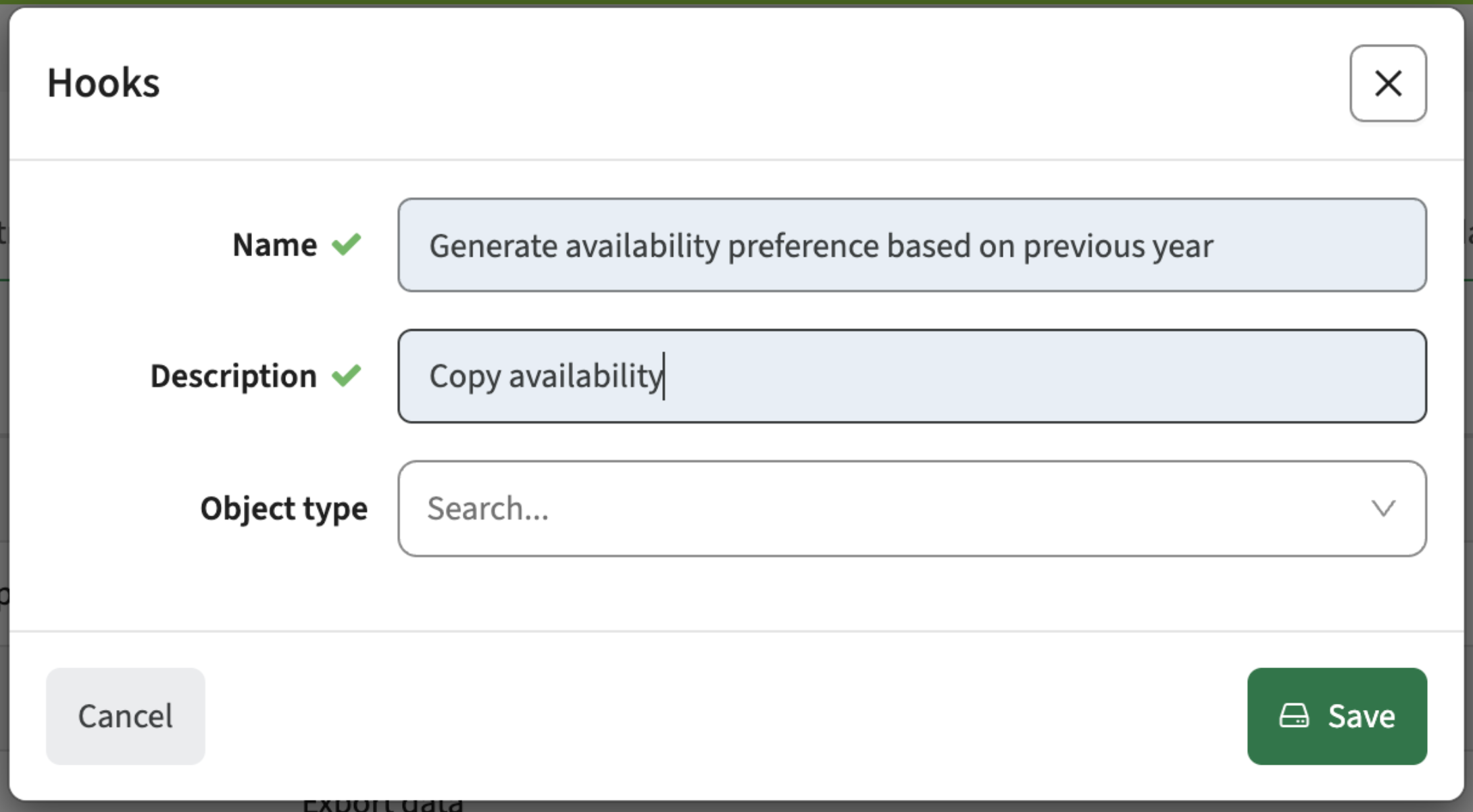
As a proces manager I should be able to copy the weekly availability to a new period - CUR-3548
The standard behaviour for the weekly availability pattern gathering is to start with an empty pattern, so the user can fill-out their availability for the requested period/semester. To support starting with a filled template based on the previous period/semester a hook is made available.
Configuration:
- Go to Administration / hooks
- Define (create) the new hook (select the generate availability preference and give it a description)
- Use the hook, e.g.:
- At the first process status, so when starting the hook the availability will be pre-filled
- From the process manager. his will allow to fill the availability at the end of the process cycle. For instance filter all availability request that have not reach the final status (or are still in the initial status. That means they are not picked-up by the staff member. For those fill the availability using the hook.
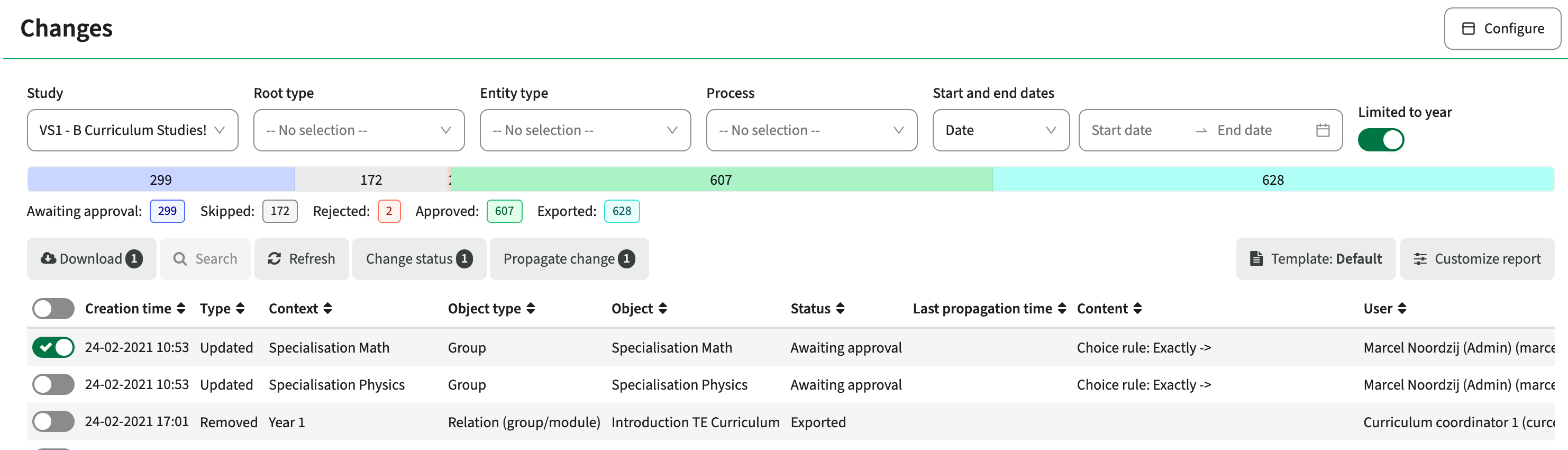
When searching a user should be informed the number of search result exceed the 'search limit' - CUR-3906
When using a search from a search box, the information found is shown immediately. The search results are capped at 10, which means a larger search result will stop at 10. This was not clear for the users, resulting in not finding the information in the list. A change is made to the search results information where the user is informed about the number of items found and the number of items shown (e.g. 10 of 3475 shown). The message only appears if the search result crosses the paginated search boundary (currently set at 10). The user is aware and can adjust the search to improve the search results.
Audit trail improvements
During the upcoming sprints there will be a revamp of the audit trail reporting options. Based on feedback it is clear the audit trail in its current form requires some updates to make it more useful. The main issue is the fact the audit trail is showing too much information. The audit trail was not configurable and shows the audit log for a specific education object including all changes in the related child object. This means for a study, not only the changes at study level were shown, but also changes to the level of a number of group or room type change on an individual activity. Too much information for validating and approving a curriculum based on the vital changes.
The main change is the option for the administrator to configure so-called 'change categories', e,g. 'relevant study changes for approval'. A change category can be configured in such a way that the relevant educational objects and sub-objects can be selected, so only the changes made to the selection will be in the change report. The administrator can then configure the report to show a specific defined category and use the page in the relevant workflows. The user will have the option to switch between reports with meaningful names, focussing on specific change areas.
Next to this changes, the earlier already mentioned UX (UI) and WCAG2.3 compliancy will be picked up for the audit-trail and its related forms and reports.
Move the change-report to the new UI components - CUR-3120
The first step is the migration of the change-report to the new look and feel using the standard TE UI components. There will be done some additional changes, e.g. to support the selection of the configured 'change category'.
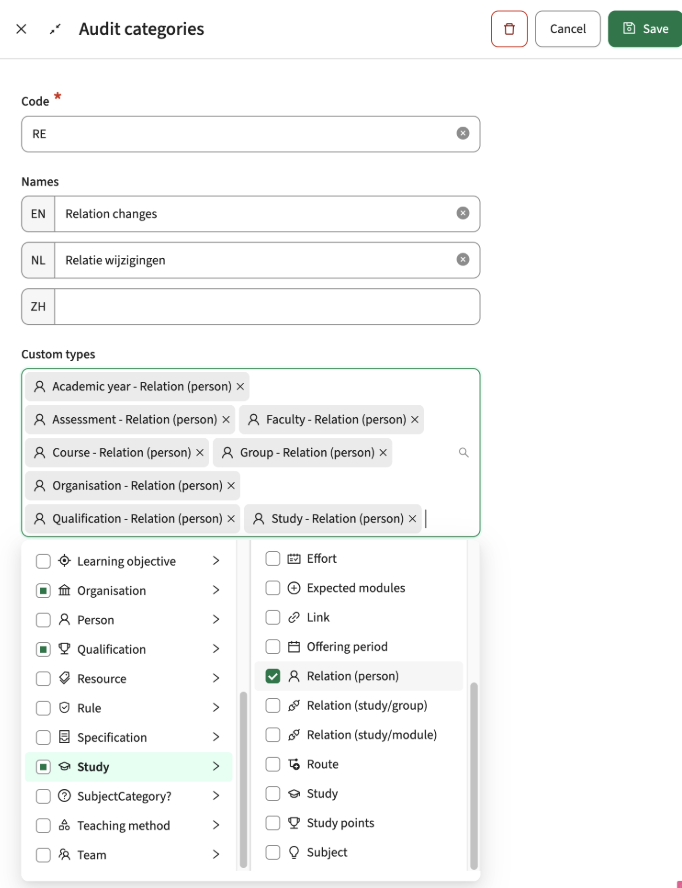
As an administrator I want to define change categories - CUR-2686
As already mentioned above, the administrator will get the option to define so called 'change categories'. A new menu-option is added to the Administration menu to define the Change/Audit categories.
The Administrator can create new categories, as is shown in the image below. Relevant information is:
- Code: required unique identifier
- Name: shown to the user in the 'select template' dropdown
- Overview of the selected change types
- Option to select more change types, based on the standard object structure and its sub-objects
The example show a 'relation changes' category. The selected reportable changes are bound to the relation for each of the educational object. The report will show only relation changes, based on the context the report is called and authorisation. Context means that if the 'Relation changes' template is used by a program director (study level), only the relation changes from that study downwards will be shown (module-group, module).
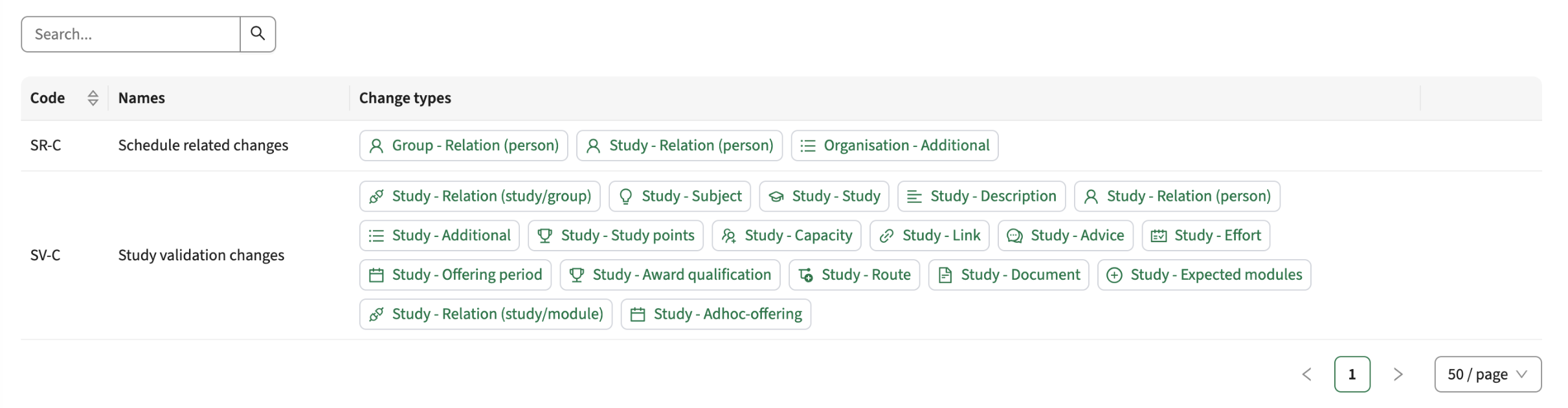
The defined 'change categories' and their selected change types are listed when opening the administration menu.
As a bonus, at object level the related 'change categories' are shown and clickable for direct navigation.
Integration
The issues mentioned under the section integration are considered as extension, improvements or bug fixes related to the Curriculum API, OOAPI and/or CSV import functionality.
The related api should report object-relation changes - CUR-3998
The related api provides information on the inner-object relations, e.g. study -> module-group or study -> module. As part of the change to register the relation changes, the api related api is extended to provide the inner-object information,
Activities with no duration should not be sent to DM - CUR-3951
Activities can be defined with a no duration. Since these activities need no scheduling, a choice is made to filter these activities from the DM integration. This means that activities with no or zero duration will not be exchanged to DM.
Security
An integral part of our development and build process is automatic scanning for known security vulnerabilities. The vulnerabilities will be fixed based on their impact, which means that in some cases an immediate hot-fix will be applied, and in other cases the vulnerability will be fixed in the current or next Sprint (release). The security section provides an overview of the vulnerabilities mitigated. For more information on reported vulnerabilities, see the central database of vulnerabilities.
Implemented security fixes - CUR-3083, CUR-3862
Based on our daily running security validation, the used libraries with a either a critical or high reported vulnerability have been updated.
Next to that we solved some minor findings from the internal white box security test.
Refer to the Curriculum manual for configuration guidance.