The release notes provide information on the features and improvements in the specified version. The release dates that are related to the version of the release are published in the Curriculum/Workload Management release schedule.
Improvements
The issues in release mentioned under the section improvements are considered as new functionality, user experience improvements or bug fixes. Issues marked as Hotfix have been developed during this Sprint release, but are hotfixed and technically added to the previous release or direct to production based on the impact of the issue.
The year switcher should only show configured years - CUR-3901 (Hotfix)
The year switcher showed not only the configured years, but also years created using simulation. This has been hotfixed, to show only the configured years.
The search (typeahead) only shows the first 10 hits - CUR-3905 (Hotfix)
The typeahead (search) in selection fields, e.g. relation, element, reference matches the values in the list based on the typed characters. A fault was introduced that limited the search to only show the first 10 results. This has been hotfixed, and the typeahead (search) is showing also the matches that exceed the first 10.
When clicking on a person I should be redirected to the person details - CUR-3868
The general page shows the roles and related persons. The option to click on the person and jump to the person details was broken. This has been fixed and the person details are again available by clicking the person on the general tab.
As an administrator I want to use conditions that restrict using the users' role - CUR-3808
A requirement was raised to improve the filtering in processes by limiting it to role. Currently the limiting is supported on authorisation, but that is limited in flexibility.
An option is added to define a filter hasRole() to limit access to specific roles. This will allow to filter the page in the workflow on a role, and will extend the usage of the parallel processing of workflows by defining one page and filter the different pages on the role.
Use case:
Define a process to wait for different persons
- Add a workflow with 3 different teams (representing 3 parallel executors)
- Configure the workflow with the hasRole() filter to limit page view to the different teams (roles)
- Users can run their workflow in parallel, the process waits for the last to finish.
- Users will only see the pages relevant for their role.
Configuration:
- hasRole(<code of role>, <object type>) - :hasRole(modCoor, module) or :hasRole(modCoor)
- The code of role is the code as configured for the role, e.g. Module coordinator = modCoor
- The object type is optional, and can be used to specify the type in case the code is not unique, e.g. faculty, study, module
Numeric fields should support pattern validation - CUR-3773
The configuration of fields offers the option to specify patterns to limit / standardise the input options. It was found the implementation for numeric fields was incorrect. This has been fixed and patters can be used.
Configuration advise:
If possible use the standard configuration options to specify number of decimals, minimum and maximum value to restrict input. Only in the rare cases these are not sufficient, use a pattern.
As a manager I want to force upload of prove for a competence - CUR-889
Certain competences require the upload of a document providing evidence/proof. To support this requirement the option has been defined to enable both setting a field condition and the required checkbox. Once both are met, the document upload is shown and an upload is required. Otherwise, the download will not be shown.
A new custom field type is added 'DOCUMENT', that allows the definition and configuration of the document upload. It also supports the upload of multiple document fields. As shown in the image below there is a required document upload (set by the competence required evidence setting) and an optional upload.
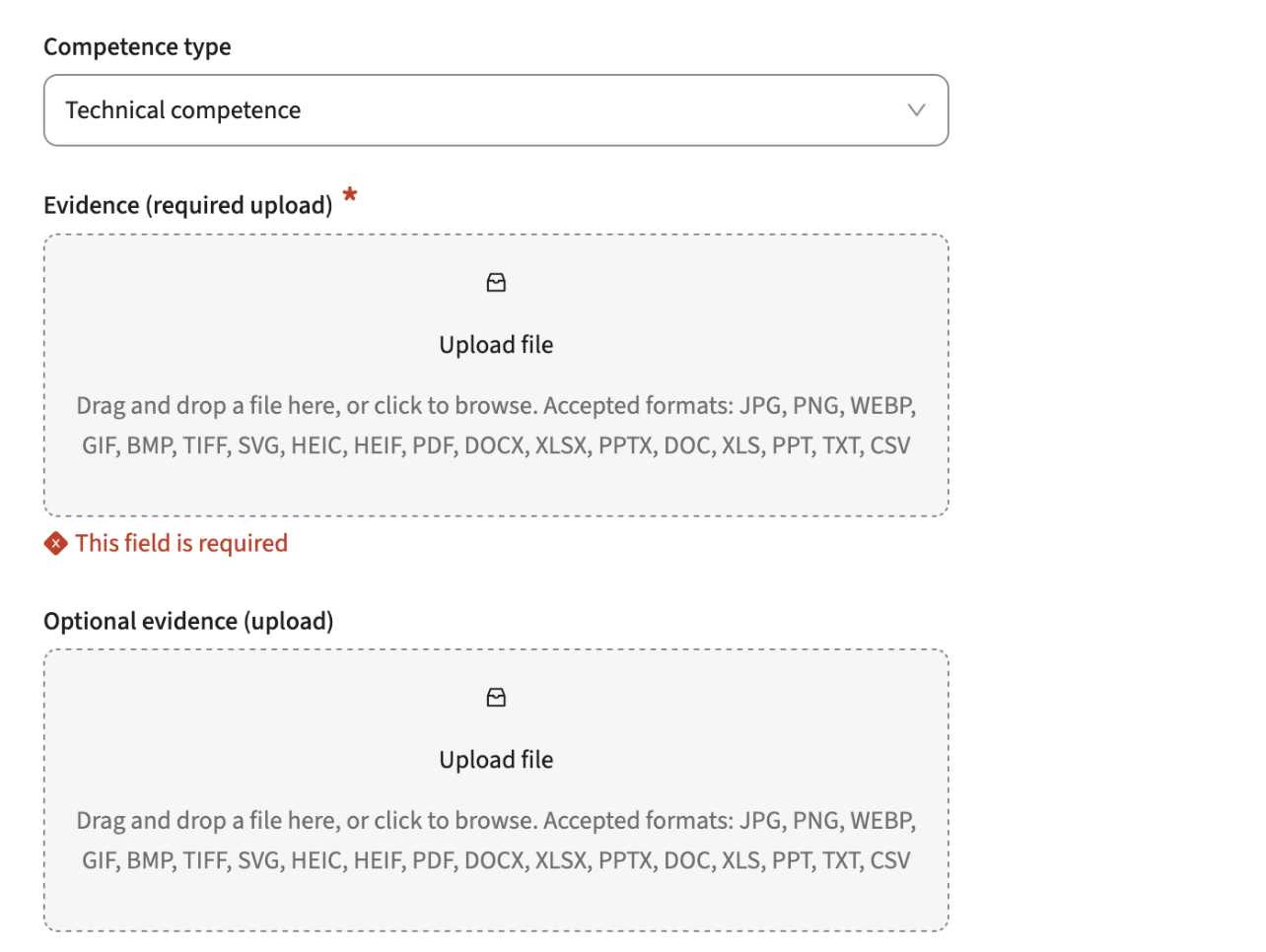
Configuration:
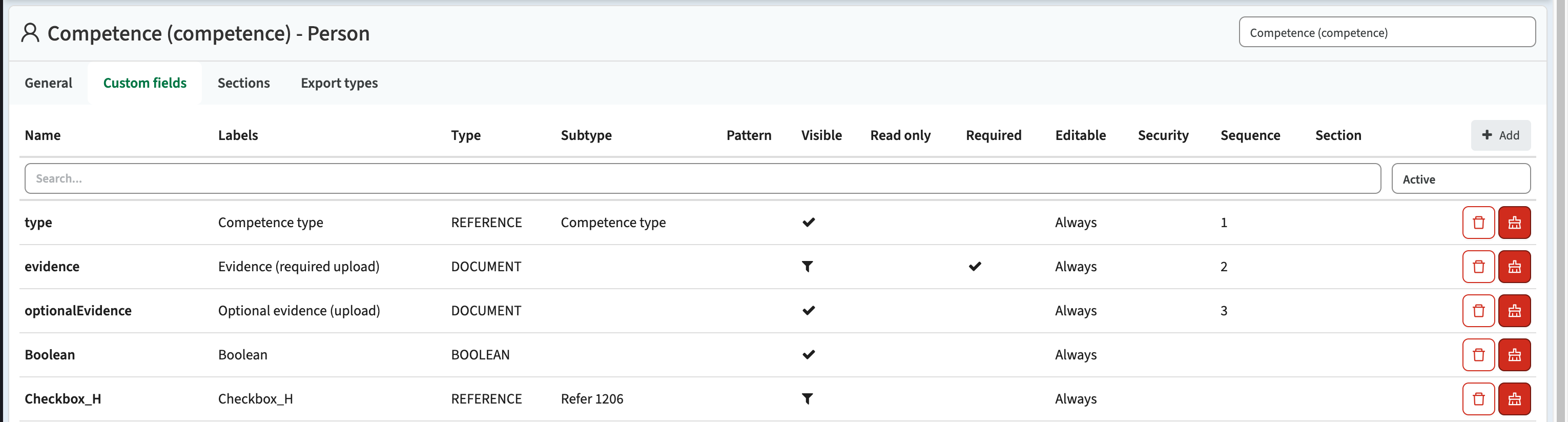
The screen above is configured using the setting shown below. The first three fields define the screen part shown above:
- type: defines the field to select the competence the user wants to add to its competence list
- evidence: a document upload that is configured to be required:
- Condition used: :competenceType.requiresEvidence = 'true'
- optionalEvidence: a document upload to optionally add evidence
The optional evidence condition can be configured as the opposite of the requiresEvidence to support only showing one upload option. The required is the required evidence is set, otherwise the optional.
In reporting both can be shown in the same document list.
As an administrator I want to manage the active experimental features - CUR-3764
Not all new features built are immediately ready for production on a large scale. In those situation we aim for developing the new feature as a 'experimental feature' first. This feature can be activated by the administrator, to allow additional testing and providing feedback. This release a change was made to the experimental feature that provides an overview of all available features and allows for more detailed configuring what feature(s) should be activated.
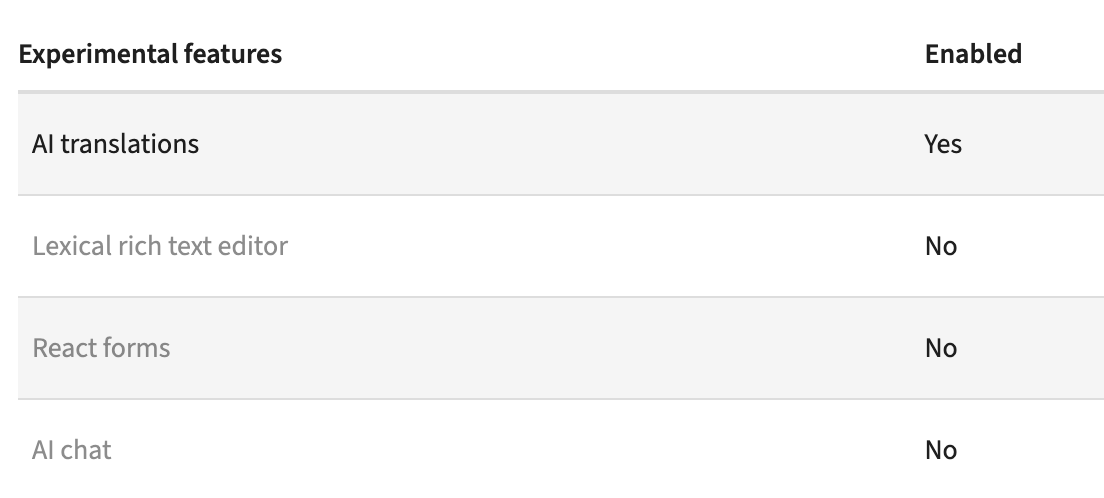
Experimental feature: Lexical rich text editor
A new feature is made available called the 'lexical rich text editor'. This will be the replacement of the current used HTML and Markdown text editor, offering a more stable, configurable options. In this release it is release as a feature complete substitution of the current editor. It is a feature flag option, to allow administrators to test drive. In the near future the lexical editor will be activated as the standard editor.
Experimental feature: React forms
As part of staying technically up to date and a new, crisp, WCAG compliant interface we're constant working on migration parts of the system to the TimeEdit UX components using a new front end development framework. For specific changes that will eventually affect users, we decided to first implement them as feature flags that can be switched an tested. Forms shown to users are pretty complex, think about input validation, display types, labels, required or not, conditions, etc. The new 'forms' are feature complete with the current forms, and when toggling the feature flag two forms are shown in the new UI with the new logic:
- Study -> General page
- Module -> General page
Security
An integral part of our development and build process is automatic scanning for known security vulnerabilities. The vulnerabilities will be fixed based on their impact, which means that in some cases an immediate hot-fix will be applied, and in other cases the vulnerability will be fixed in the current or next Sprint (release). The security section provides an overview of the vulnerabilities mitigated. For more information on reported vulnerabilities, see the central database of vulnerabilities.
Implemented security fixes and checking mechanism - CUR-3918
We realised the number of security fixes had been pretty low. We did some manual checks in the central registry and found out we had missed quit some vulnerability updates in the last 6-8 weeks. There is a fully automated process reporting the vulnerabilities, but the process didn't report any. We found out the reachability of the central repository had been sub-optimal the last period, causing our automatic checks to fail.
Next to adding additional validation on execution of the automatic checking mechanism, we fixed all the vulnerabilities reported by the checker after fixing the failure situation. The reported vulnerabilities were investigated and fixed.
High
- CVE-2026-29062 (High)
- CVE-2026-22731 (High)
- CVE-2026-54512 (High)
- CVE-2026-54513 (High)
- CVE-2026-24880 (High)
- CVE-2026-34487 (High)
- CVE-2026-40988 (High)
- CVE-2026-41842 (High)
- CVE-2026-41850 (High)
- CVE-2026-54399 (High)
- CVE-2026-54428 (High)
- CVE-2026-54428 (High)
Medium
- CVE-2026-32990 (Medium)
- CVE-2026-54518 (Medium)
- CVE-2026-41706 (Medium)
- CVE-2026-41841 (Medium)
- CVE-2026-41843 (Medium)
- CVE-2026-22745 (Medium)
- CVE-2026-22748 (Medium)
- CVE-2026-41851 (Medium)
- CVE-2026-41853 (Medium)
- CVE-2026-54514 (Medium)
- CVE-2026-54515 (Medium)
- CVE-2026-54516 (Medium)
- CVE-2026-54517 (Medium)
- CVE-2026-40975 (Medium)
- CVE-2026-41854 (Medium)
Low
- CVE-2026-22746 (Low)
- CVE-2026-41694 (Low)
- CVE-2026-41848 (Low)
- CVE-2026-41852 (Low)
- CVE-2026-22741 (Low)
Refer to the Workload Management manual for configuration guidance.