The release notes provide information on the features and improvements in the specified version. The release dates that are related to the version of the release are published in the Study guide release schedule.
The release has been delayed on Acceptance due to an issue we loved to take along in this release. The release time was around 16:10 CET.
Improvements
The issues in release mentioned under the section improvements are considered as new functionality, user experience improvements or bug fixes. Issues marked as hotfix are developed in this sprint but applied to the previous release or directly to production, depending on impact.
Accessibility analysis and improvements - SG-681, SG-507, SG-673, SG-506
An in-depth accessible analysis has been performed focusing on the WCAG-2.2. A short list of non-compliant issues has been defined to be picked up during the next 2 sprints. During this release the next two issues have been addressed:
- The drawer (menu) on mobile applies to the WCAG standards
- Various layout and visualisation changes to detail pages
- All elements should be accessible using the Tab
- The tab order when using the Tab key should be correct
- Various layout and visualisation changes to search result/overview pages
The filter on subjects should filter and show the label instead of the values - SG-659, SG-694
When filtering on a skill/competence (subject), there were no results reported and the selected filter showed the value (code) instead of the label. Both have been fixed, and results matching the selected filter are shown and the selected filter will show the value as displayed in the image below.
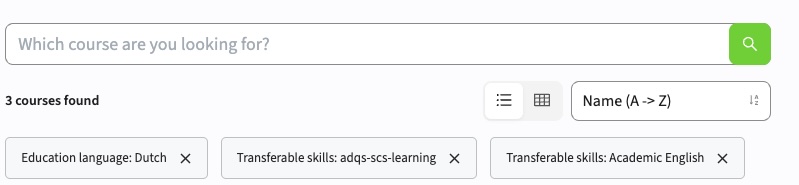
A filter option is added to restrict the filter not only on the subject type, but also on the subject category, e.g. category=Comms or categoryType=Skill or the combination category=Comms&categoryType=Skill. Similar to other widgets already using the type of the overarching group. This filter will first work after the next release of Curriculum, so 1 week after the release of this version.
The inward link should not be shown as outward link - SG-695 (Hotfix)
The display of the link information was incorrect. The inward link was shown as outward link, and linked modules could also appear on the same line, instead of clearly separated at multiple lines. This has been fixed and the link information is shown correctly again.
The Curriculum import should not fail - SG-585
Incidentally the nightly import of data from Curriculum / Broker fails with an Exception. The logging and failures of the last Month have been analysed and the synchronisation is made more robust to cover for the found issues.
Multiple tabs using qualification should work - SG-697
When using multiple tabs in a Qualification, only the first tab showed content. Any other tab didn't show content, but redirected to the first tab. This was caused by a typo (a missing 's') in the standard URL detection, and is fixed. Multiple tabs in qualifications will work as they should do.
Security
An integral part of our development and build process is automatic scanning for known security vulnerabilities. The vulnerabilities will be fixed based on their impact, which means that in some cases an immediate hot-fix will be applied, and in other cases the vulnerability will be fixed in the current or next Sprint (release). The security section provides an overview of the vulnerabilities mitigated.
For more information on reported vulnerabilities, see the central database of vulnerabilities.
During this release no security vulnerabilities were reported, requiring mitigation.
For more guidance on configuration and setup of Study Guide, use the relevant Study Guide manual.