The release notes provide information on the features and improvements in the specified version. The release dates that are related to the version of the release are published in the Curriculum/Workload Management release schedule.
Improvements
The issues in release mentioned under the section improvements are considered as new functionality, user experience improvements or bug fixes. Issues marked as Hotfix have been developed during this Sprint release, but are hotfixed and technically added to the previous release or direct to production based on the impact of the issue.
The duration field dropdown should show the duration - CUR-3806 (Hotfix)
In some cases the duration dropdown field was shown empty, even if a duration had been filled in an earlier phase. This causes the user to re-enter in order to proceed. This has been hotfixed, and the dropdown is properly filled with the earlier entered data.
Order of notifications should be newest first - CUR-2458
The notification shown on the dashboard (bell icon) were shown with the oldest notification on top. The order has been changed, showing the last sent (newest) notification on top.
As a user I should be able to assign a team to a role - CUR-3814
The assignment of the responsible person(s) to a role can be done either by assigning the individual person(s) and/or assigning a team. It was found the option to add a team was broken. This has been fixed, and teams can be assigned to roles again.
As a user I want to save a description with controller in the text - CUR-3744
Sometimes you're surprised by a bug. It was found that using the word controllers in a descriptive text caused the save to fail completely. The issue is addressed, and it's now possible to save texts with the word controllers in it.
As an admin I want to configure the option to create new activities - CUR-3482
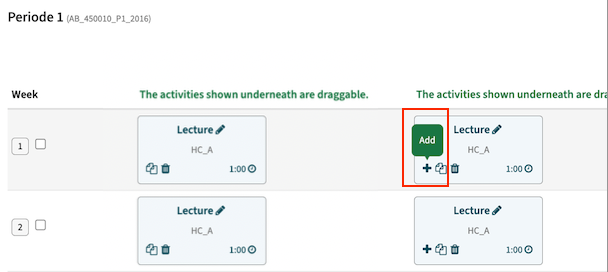
If you click “+” on an activity in an activity-grid page, you can create a new activity within the same series in the same week. Since Data manager doesn’t support series with multiple activities in the same week the user should not be able to create these duplicates. This to prevent issues in the integration and 'loose' activities in Data Manager.
Configuration:
- Set the global configuration (administration/configuration) for schedule.prevent_duplicates to true
Below the two options are shown next to each other. Left the options with the prevent duplicates option set to true, right the default option (prevent duplicates is false).
Integration
The issues mentioned under the section integration are considered as extension, improvements or bug fixes related to the Curriculum API, OOAPI and/or CSV import functionality.
OEAPI eduXchange published with the incorrect year - CUR-3813
In case the active year, used for the retrieval of course and/or minor information by eduXchange, was changed, the data was not updated to reflect the new year. The cause was that a change of the configuration parameter OOAPI.year was not immediately effectuated, since this is held in the application cache. A more frequent refresh of the configuration cache is implemented to limit the time between the change and the effectuation.
Enable sending activities to Data Manager via new 'internal' endpoint - CUR-3735
The data exchange to Data Manager is managed by configuring a hook using the standard defined integration. Since in the (near) future the used endpoint of DM will be replaced, the new endpoint is already implemented. During a transition period (until the end of life of the current endpoint) both options will be available. Once the current endpoint is no longer supported, the corresponding hook option is removed. In the meantime it is advised to change the configuration to the variant with 'new' in the name.
The result of event-based data exchange should support the status 'QUEUED' - CUR-3766
When using the event-based data exchange, the supported responses from the receiving system (ESB) are SUCCESS or ERROR. Any other value will always be handled as ERROR. Since not all data will be executed immediately after reception in the ESB, a request was made to support the status QUEUED. This should be handled as a SUCCESS, but provides insight on the actual handling (synchronous or a-synchronous) to the administrator.
Handling a module with a large(r) number of offerings should not give an error on status update - CUR-3796
In the end a highly technical issue, not immediately visible or affecting data. In case a module with a large(r) number of offerings was sent to Data Manager, the result of the processing was not always updated. This was caused by a timing error. Curriculum sends the package of offerings as a whole, and expected updates on the individual packages after that. But in practice the updates were processed immediately, and the results could come back before all offerings were sent. This caused the effect the activity update was done, but not marked correctly as processed in the Curriculum log. The mechanism is changed, and the updates can be processed while not all activities have been sent yet.
Security
An integral part of our development and build process is automatic scanning for known security vulnerabilities. The vulnerabilities will be fixed based on their impact, which means that in some cases an immediate hot-fix will be applied, and in other cases the vulnerability will be fixed in the current or next Sprint (release). The security section provides an overview of the vulnerabilities mitigated. For more information on reported vulnerabilities, see the central database of vulnerabilities.
Improve security based on extensive code analysis - CUR-3794
On a regular base an extensive security audit is performed using black box testing. During this sprint an in-depth white box testing is done. White box testing is testing with access to the actual code, allowing not only to find vulnerabilities via API or other 'external' touch points, but in-depth analysis of the code for possible vulnerabilities.
Some minor issues have been identified, that are fixed in this release.
Refer to the Curriculum manual for configuration guidance.