The release notes provide information on the features and improvements in the specified version. The release dates that are related to the version of the release are published in the Curriculum/Workload Management release schedule.
Improvements
The issues in release mentioned under the section improvements are considered as new functionality, user experience improvements or bug fixes. Issues marked as Hotfix have been developed during this Sprint release, but are hotfixed and technically added to the previous release or direct to production based on the impact of the issue.
Personal plan should not give an error upon opening the task list - CUR-3642 (Hotfix)
When viewing a personal plan and expanding the tasks section for study related tasks, an error could be thrown (undefined property ...). This was caused by the fact the study relation was not defined for the task. A hotfix is applied and the study related tasks are shown.
The personal overview of relations should be responsive - CUR-3665
In case a person has many relations (e.g. >150) the personal relation overview takes quit a while to load. A number of fixes is applied to inform the user and perform a responsive initial load:
- A loader is show to inform the user the page is being loaded
- The page is paginated, and the first page is shown. The user can navigate to the next pages.
- Sorting is performed in the back-end, reducing the load on the browser
As an administrator I want to use 'if ... then ... else ...' in conditions - CUR-3578
The support for conditions is extended with an 'if ... then ... else ...' construction, supporting nested condition. E.g. If (x=1) then 'set value X' else (if (x=2) then 'set value Y' else 'set Value X').
The used convention is: (condition) ? 'value if true' `: 'value if false'.
Examples:
- (:age < 40) ? 'this is true' : 'this is false'
- (:age > 40) ? ( (:age > 60) ? 'this is old' : 'this is middle-aged') : 'this is young'
The column search in reports should work - CUR-3593
The column search in reports allowed the user to enter a search value, but the search was not executed. This has been fixed and using the column search with a value will return the matching rows.
A successful deleted activity-serie should not show an error - CUR-3507
When deleting an activity-serie on a method/assessment an error message pops up, even if the activity-serie is successful deleted. This has been fixed and the activity-serie is deleted without error message.
Automatic login not shown to users - CUR-3510
A user could be logged out in the middle of a session without warning. Identifying the exact moment the session is ended it a technical challenge. To limit the user impact, and improve user experience the first change applied it to extend the duration of the login-session to 10 hours (instead of 3).
It should be able to force delete a module without error - CUR-3660
In some cases a module that should be force deleted was not deleted but showed a deletion error. This was caused by an incorrect order of one of the underlying delete statements. The order is corrected to enable module deletion in all cases.
Creating and working with a new report template has strange effects - CUR-3484
A report was made that when creating a new report template, changing it afterwards and refreshing the page, the report was not showing as defined. After thorough investigation we identified this could happen in case the template name was equal to another template name. To prevent this from happening, the management of the template is no longer bound to the 'template name', but to the underlying technical ID.
As an administrator I want to see where a reference list is used - CUR-1864
Reference list can be used on different fields, and the system didn't provide an easy way to find those fields. A change is made to show the fields using a reference list, similar to other configurations that show where the specific object (e.g. page, workflow, ...) is used.
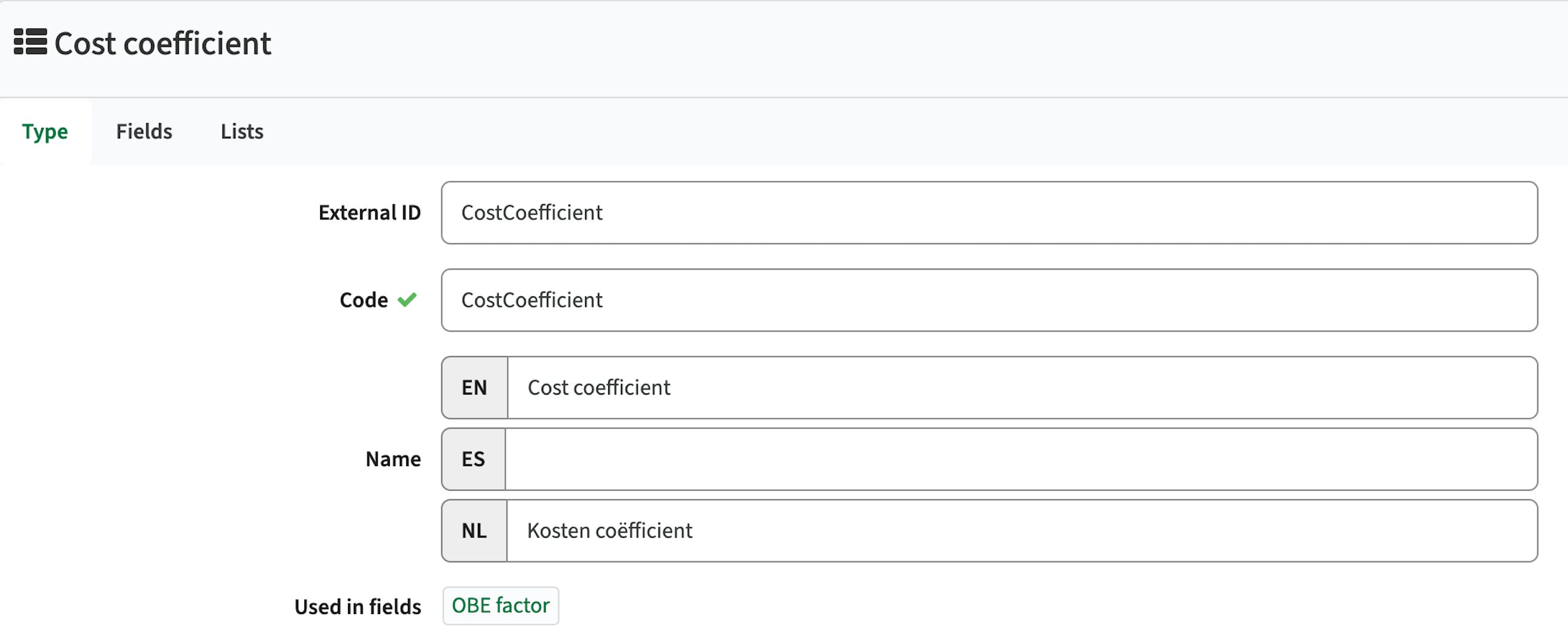
The admin can click the field, to jump direct to the field configuration.
Conditional reference lists should be respected - CUR-3596
When using a reference list with configured conditional lists the conditional list was not correctly shown based on the defined configuration. This has been fixed, conditions will be respected and the correct list is shown.
Integration
The issues mentioned under the section integration are considered as extension, improvements or bug fixes related to the Curriculum API, OOAPI and/or CSV import functionality.
Extended support activity mapping to Data Manager (DM) - CUR-2715
The exchange of activities to data manager didn't support the option to define a set order. The mapping is extended with support for the sequence.
The localName of an activity was already available in the mapping, but in case the localName was empty a fallback was implemented to provide a default value. This fallback is removed to enable distinction between no value defined and value defined.
Support multi-value data exchange to Data Manager (DM) - CUR-2715
Support is added to exchange multi-select values to Data Manager. The values sent are in a single field, separated with a | (pipe) to meet the DM standards.
Security
An integral part of our development and build process is automatic scanning for known security vulnerabilities. The vulnerabilities will be fixed based on their impact, which means that in some cases an immediate hot-fix will be applied, and in other cases the vulnerability will be fixed in the current or next Sprint (release). The security section provides an overview of the vulnerabilities mitigated. For more information on reported vulnerabilities, see the central database of vulnerabilities.
In this version no vulnerabilities needed to be addressed.
Refer to the Workload Management manual for configuration guidance.